Monday, March 20, 2017

SVPRO 3D VR Camera REVIEWS Special Column

Website: http://www.trendsloving.com/

This is a 3D VR camera which can be used to record 3d video (short for:VR camera). It can capture dual 720p 3D video, just need to connect it into Android phone, you can record 3d video any time any where, it can achieves 3D visual effect through 3D glasses. You can feel be personally on the scene.

Product picture:
Four color:

How to use it?


Oliver is our friend who like electronic product very much.This is the video from Oliver,he said'This is a nice little 3d vr camera that feels great in the hand. It's main feature is that it can make 3D videos that will look great in VR.

Compatible smart phone(make sure you have one of these phone):

Samsung GALAXY:S5/S6/S7, Note 4/Note5, C5/C7
HUAWEI:Mate8, Maimang 4, G7, P9, Honor 8       Lenovo : ZUK Z1 Z2
OPPO:R5/ R7/ R7Plus/ R7SM/ R9/ R9Plus, N3      Vivo:Xplay5
Nubia:Z7/Z7Max/Z7mini, Z9/ Z9Max, Z11             Meizu: Meizu E  
LeECO:Le Max, Le Max2, Le Max Pro                  Sony:Xperia Z3/Z5/Z5 Premium
ZTE:AXON, AXON 7 , AXON 7max                        HTC: One OneM8
XIAOMI:4/ 5 /Note                                                  Samrtisan: T1
Redmi:Note2,Note3                                               OnePlus:OnePlus 3

3D VR Camera download Link(make sure download the correct app): 

Android : https://www.dropbox.com/s/dgoj21sbi5su07p/vr3dcamera.zip?dl=0


Android 7.0 : https://www.dropbox.com/s/skatsdjcs6mi2av/vrcamera732.zip?dl=0

----------------2017-6-8 end ------------------------------------------
Qusetion:

Why choose the right cell phone?
Why choose the right app?

Customer A(right cell phone,right app):

Hi, I bought the 3D VR Camera as a kit that includes a VR Headset. I must say I am very impressed with the product. I was first a bit sceptical about the camera quality and a bit in doubt of how it was going to work. But it is a very simple to use camera and the vr headset and the results combined are great. I filmed some plants outside using my Samsung Note 4 and the footage really looks 3D. It enables you to make similar 3D effects of balloons, water, etc as you see in 3D films in the cinema. As a bonus you can also use the VR Headset for any of the thousands of apps on the google play store. I downloaded Insidious 3 VR app and really enjoyed it. I would definitely recommend this product, just make sure your phone is compatible and bigger phones work better with the VR Headset than smaller ones. See pros and cons below and also the images attached.

VR Camera
Pros: Simple to use, uses power from the phone (no batteries required), true 3d with two separate lenses and sensors, easy to use app, good metal build quality, good image quality even in low light, price
Cons: Doesn't work with iPhone, doesn't work out of the box with usb type C, app crashes sometimes, app can be glitchy, app update not through play store, might deplete your phone battery faster

VR Headset
Pros: Build quality is great, very simple to use, lenses are of good quality, image looks crisp, works with any VR app, can see movies in 3d, easy to put phone, charge port and headphone easily accessible while using, price
Cons: No buttons on the headset, not comfortable for prolonged use, only horizontal adjustment of lenses (can't zoom in and out to make more/less VR)

Overall very happy with the product :-)


Customer B (choose Incorrect App):

April 21, 2017
I'll update this when I have more info but at least after my first few attempts I have not been able to get the app that runs this camera to work properly on my phone.

I have a Galaxy S7 which is one of the models that this is designed to run on but wonder if a recent Android update is causing the problem (Android 7.0). I have installed the latest app both from Google Play as well as directly from the mfg website. The error I receive is always the same, I briefly see the app start screen and then the app closes with an error message: "SVPRO VR Camera has stopped."

Aside from the problem with the app it appears that the camera itself is sturdy; it also came with a small tripod which seems to hold the camera securely.

Obviously none of this will do me much good if I can not use the camera; as the app is the only means to do so it looks like I will probably have to return this camera.

Sorry to Customer B,Android 7 has been updated to the latest version and can be used now.

Enjoying Time:


Blogger's review 


I've been sent a 3D camera addon to review . It will also work with a Raspberry Pi!
It looks a little like a Microsoft Kinect - a single bar with two embedded cameras. The camera resolution is 720p on each lens.
You can buy the 3D VR Camera from www.trendsloving.com.
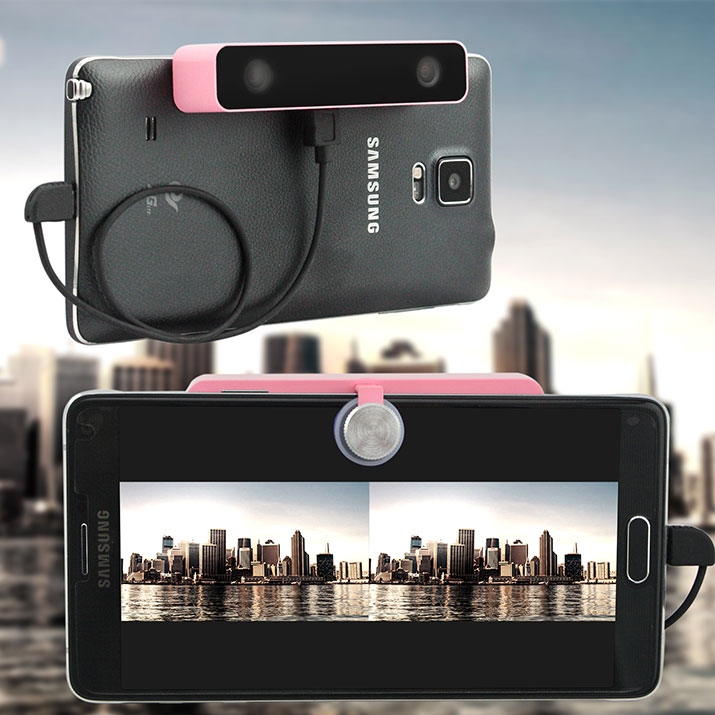
3D camera clipped to a phone, sat in a tripod
It clips on easily to a phone via a padded screw clamp. You need to install a dedicate 3D camera app in order to make it work. In the box you get the camera, two USB-OTG cables, a tripod and clamp, and a carrying pouch.
Let's take it for a spin!

Sample shots

Video

As you can see, the 3D effect is prominent.
Video quality is 2560x720. Framerate is variable depending on how fast your phone is. My Nexus 6 managed just 16fps, my S6 got to the slightly better 25fps.
Because the cameras are independent, their exposure and white balance aren't linked. This also means that occasionally one camera may drop a frame or exhibit tearing - while the other side remains unaffected.
The cameras work best in bright light. Too much motion and the JPEG encoding can't keep up. You can stream raw YUYV video off the device - but you need to either lower the framerate or resolution if you want the USB bandwidth to be sufficient.
Audio is aac, 44100 Hz, mono, fltp, 67 kb/s
You don't get stereo sound, which is a little bit of a disappointment. There are no microphones in the unit - audio comes from your phone's mic. I've removed the audio from the above videos
3D metadata isn't embedded - this is needed for sites like YouTube to recognise them as 3D videos.

TV Playback

I uploaded a sample video to YouTube - which has native 3D support. I was able to stream the video to my smart TV and watch it using 3D glasses.
A smart TV is playing a 3D video on YouTube

Photo

The Svpro app doesn't let you take photos! A bizarre omission. I cheated and used the phone's screenshot tool to capture these. Click for full size.
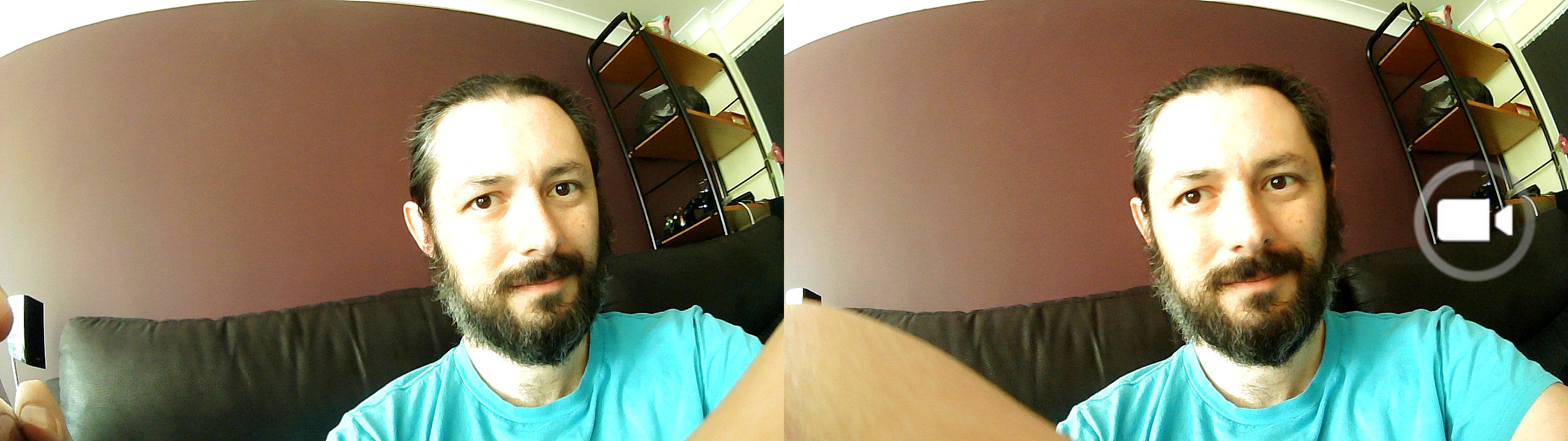
3D shot of Terence Eden
3D photo of a river

App

Android doesn't natively support external cameras - so you need to download the Svpro app. It's basic - you can record video and play video. That's it!
No photo capabilities, no resolution or quality settings, no framerate control, no video editing or upload to YouTube.
Worse, the app in the Google Play Store doesn't support Android 7.0 - you need to download it directly from http://www.svpro.cc/app/.
I found that the app would not keep the screen on while I was recording. You may need to adjust your phone's display settings if you want to keep the screen active.
On the positive side, it doesn't ask for crazy permissions - although you will need to grant it USB access.
Screenshot of an Android app asking for USB permissions
There are other apps on the play store which you can use, which show how good the Svpro app could be. For example, this is USB Dual Camera:
Screenshot of an Android app displaying two cameras and a host of options
That's not a perfect app, but it gives you an idea of the potential.
The Svpro app also seems quite slow - which sometimes leads to disappointing video results.

Raspberry Pi Linux support

Although this camera isn't advertised as working on Linux, it is a USB camera - and it works brilliantly!
Running lsusb gives us:
Bus 001 Device 004: ID 1a40:0101 Terminus Technology Inc. 4-Port HUB
Bus 001 Device 005: ID 0ac8:9902 Z-Star Microelectronics Corp. 
Bus 001 Device 006: ID 0ac8:9901 Z-Star Microelectronics Corp. 
So this is a USB hub with two cameras attached to it! It shows up as /dev/video0 and /dev/video1 - and both cameras work perfectly!
Screenshot of Ubuntu showing left and right images from 3D camera
It supports YUV 4:2:2 (YUYV) and MJPG for video capture and, pleasingly, each camera is 1280*720 native. No interpolation!
The Raspberry Pi website has a quick tutorial on capturing images.
You can capture the MJPG directly from the camera. This is the quickest and most efficient way to get 25fps video out of the device - although the filesize is rather large (5MB per second).
avconv -f video4linux2 -input_format mjpeg -i /dev/video0 -t 00:00:05 -c:v copy output.mkv
That will only capture from one of the twin cameras. How do we get both? Here's a lazy way to capture dual USB cameras simultaneously.
avconv -f video4linux2 -input_format mjpeg -i /dev/video0 -t 00:00:05 -c:v copy outputL.mkv & avconv -f video4linux2 -input_format mjpeg -i /dev/video1 -t 00:00:05 -c:v copy outputR.mkv
That worked on my Pi 2 Model B - I'll write a blog post soon explaining other ways to do this.

Technology

At the start of the decade, my mate Ket was building his own 3D cameras. Literally two cameras wired together and mounted next to each other.
Some self-build 3D cameras.
It's incredible to think how quickly technology has progressed. For £65 you get a lightweight (50g) and tiny (92mm * 20mm * 20mm) camera pairing. The distance between the cameras is almost identical to the distance between my pupils. The view angle on each lens is 100°. Perfect for stereoscopic viewing.
But pushing all that video over a USB cable is tough. A more practical design may be to place the video processing within the unit - rather than relying on the USB bandwidth and phone speed being sufficient.

Downsides

There are a few little niggles with the Svpro.
  • For phones, it is Android only. At the moment the USB OTG functionality only works with Android. So you iPhone users are out of luck.
  • Dedicated Android app needed. An app like this needs to be polished, professional, and a joy to use. It isn't.
  • 720p is fine for a cheap camera - and matches the resolution of most 3D displays - but a bigger resolution would be welcome.
  • Framerate should be higher - although this is partially a limitation of the speed of the USB transfer and of your phone.
  • No binaural sound. Audio is recorded from your phone's microphone, so there's no stereo effect.
Those are minor problems. The only other issue I found was that on some devices, it would capture BGR video - the red and blue channels swapped around. Which gave this weird effect:
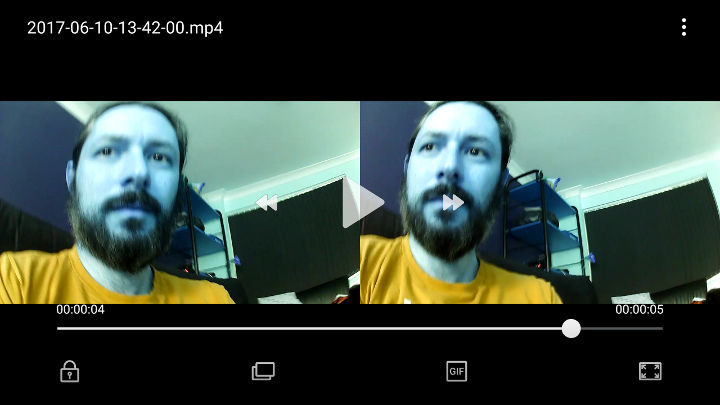
Screenshot of a video with weird inverted coloursNo idea why - I reported it to Svpro and they're looking into it.
To correct it using Linux requires ffmpeg's filter colorchannelmixer
ffmpeg -i in.mp4 -vf colorchannelmixer=rr=0:rb=1:br=1:bb=0 -acodec copy out.mp4
Recording from the Pi didn't exhibit these problems.

Buy it

If you want to get started with 3D video - for playback on a Google Cardboard or other VR headset - this is a pretty good device. The app is basic, but the video quality is satisfactory if your phone is fast enough. The 3D effect is perfect. It's also a handy way to add stereo-vision to a Raspberry Pi robotics project.
Reviews from Terence'blog


Wednesday, February 22, 2017

Good idea for you,just shoot video you can get free VR 3D Camera

This is SVPRO team,we need someone to shoot some video for our product.
If you are good at record video,you will get a free VR 3D Camera(click).


Name:  1476934409.jpg
Views: 0
Size:  366.3 KB
Name:  1474169363.jpg
Views: 0
Size:  464.6 KB
Name:  1474170928.jpg
Views: 0
Size:  188.6 KB

Monday, February 20, 2017

New 5 products sell on SVPRO amzon

1.7 Colors LED Light Bluetooth Speaker

2.USB Cell AA Rechargeable Batteries

3.Intellicharge Lithium LCD Battery Charger

4.Bluetooth Headset With Car Charger

5.Wireless Bluetooth Speaker Watch

Our website: 3D Camera


Wednesday, February 15, 2017

How to make a VR headset for $0 video from youtube


Actual operation

1. Open the carton, the more complete the better

2. Rough cut drawings, and according to the serial number

3. A reasonable layout, the drawings are glued to the cardboard box

4. After completing the above steps

5. Assembly with convex lens.Wonderful!


Now,you can make your 3D VR Glasses,come on !

If you have not enough VR resource,you can spend some money to for 3D VR camera that ctreate 3d video.

That is the video display how to set up 3d vr camera.


Thursday, January 5, 2017

The point question about SVPRO 3D VR Camera

svpro 3d vr camera


Does this work with the sumsung and sony?

Answer: This is a new product which is invented to record 3D videos.The 3d vr camera only works with android(no iOS support yet).These are the compitable mobile phone that we had tested:Samsung GALAXY S5/S6/S7/S6 Duos/S6 Edge/S7 Edge, Note

3/4/5, GALAXY A5/A7/A9, HUAWEI Mate 7/8/S, P8/P9/P8 max/P9 Plus/G7 Plus, XIAOMI 4c/5/MAX, HTC One/OneM8, SONY Xperia Z3, Lenovo ZUK Z1/Z2. We will still test more Android cell phones.


Does it shoot 360 pictures and videos?

Answer: No it does not... it is a 3d video camera that shoots 3d SBS videos. You can watch them using a VR headset for immersive experience.


Does it shoot 180 deg 3D?

Answer: No it just simulate human vision.


What kind of battery does it use?

Answer: No battery for the camera! It works with the usb connection to the phone. 


How to create vr resourece by 3d camera?

Thursday, December 1, 2016

Top 5 best vr glasses reviews 2016


3D Vitural Reality(VR) sometimes referred to as immersive multimedia,vitural reality can recreate sensory experiences,literally surrounding you with virtual video,images and games in a full 360 degree immersive enviroment.

With the 3D vr glasses,you can explore new worlds,be on-stage at a performance with full 360 degree video,and can enjoy gaming in a way that's never been done before-all with just your smart phone and 3D VR glasses.

Features
●Wide Compatibility : perfectly suitable for almost all kinds of phones (Android / IOS, etc) that screen between 4.0~6.0 inches.
●FD & OD Adjustment : Adjust your suitable focal distance by pushing the left button upside at a range of 70mm - 75mm, and adjust the object distance by pushing the right button upside at a range of 65mm - 75mm so as to get a stretch lenses(58-75mm).
●Comfort design with sponge area : Extemely soft and thick foam is perfect long time use. Top light and thin is the ultimate goal for wearing equipment.
●Ergonomic Head belt Design : Ergonomic design ensures a balanced stress condition in three points on the head (concentrated on the forehead), reducing 30% pressure to the eyes.
●Virtual Reality Apps : Check out these VR apps in Google Play store, Apple App store, and immerse in the exciting world of VR!
●Bluetooth Controller : you can experience more VR games & enjoy more convenience when watching the movies.

Tips on storage:
★Please orotect device from damping and overheating otherwise outlook function may be damaged.
★Please protect device from heavy loading.
★Please keep precise lens within from scraps and fierce colliding.
★Please keep device from heavy dust.
★Please keep the lens clean,and dust could be wiped with lens cleaning cloth or paper.
★No disassembling.

SVPRO Amazon:


Sunday, November 27, 2016

Some question and answers about SVPRO VR glasses


Question:What's the bluetooth functionality?
Answer:The bluetooth functionality means that you can use bluetooth handle to connect to your phone,then you can operate your phone conveniently.for example:pause the video or start playing video;
In addition,you can connect your phone to bluetooth gamepad,by this way,you can
enjoy your 3D vision game.

Question:Does this work for nexus 6?
Answer:Nexus 6 has 6 inches,and this VR glasses is suitable for 4.0-6.0 inches phones,so it could be work for your nexus 6.

Question:Does it work with a 7" 4th gen kindle fire with google?
Answer:This VR glasses is suitable for 4-6inches screen.
I'm so sorry to tell you that it can not work with your 7'' 4th gen kindle fire.

Amazon:
https://www.amazon.com/Svpro-bluetooth-comfortable-adjustable-suitable/dp/B01E6IHYAA

Thursday, October 20, 2016

PS VR gaming video review (three)

1: Statik


2: Psychonauts: In The Rhombus Of Ruin


3: Star Trek: Bridge Crew


4: Windlands

5: Wayward Sky

6: Job Simulator


7: Unearthing Mars

8: Bound


9: Kismet

10: RIGS: Mechanized Combat League


More game video waiting to be updated.

SVPRO virtual reality device: VR Glasses

SVPRO virual reality package: VR Camera

Wednesday, October 19, 2016

SVPRO vr camera and vr glasses sold on Amazon

3d vr camera


SVPRO 3D VR  Camera


1.Shoot 3D with android phone as we carry our smartphone around and record most of the memories using them. Just imagine how wonderful watching your favorite moments again after a couple of years in 3D vs 2D is.(the smartphone video camera).

2.The camera has a convenient screw clip to mount it on top of the phone, a Micro USB cable (equiped with the camera) and hooks to your phone's micro USB slot, and comes with a pouch to make it easier to carry in your backpack or pocket.

3.Easy use,download an APP called VR 3D camera(in Google Play or in website) in your mobile phone.Then simply plug the 3D VR camera in your phone and start shooting immediately. You would re-live your memories through those videos.(as if you are right at that moment).

4.Equiped with a bracket for convenient take the mobile phone when shooting image by the 3d vr camera,the VR 3D camera only works with android(no iOS support yet).These are the compitable mobile phone that we had tested:Samsung GALAXY S5/S6/S7/S6 Duos/S6 Edge/S7 Edge, Note 3/4/5, GALAXY A5/A7/A9, HUAWEI Mate 7/8/S, P8/P9/P8 max/P9 Plus/G7 Plus, XIAOMI 4c/5/MAX, HTC One/OneM8, SONY Xperia Z3, Lenovo ZUK Z1/Z2 etc.

5.Amazed shooting 3D video of your kids playing with his toys.Furthermore,not only can record your baby to adults's every moving and happy moment, but also leave a forever wonderful memories. Furthermore,not only can record your baby to adults's every moving and happy moment, but also leave a forever wonderful memories.


Official address: 3D VR Camera


3D VR Display


SVPRO 3D VR Display


3D Intelligent VR Display -- It's a smart 3D virtual reality glasses which equipped with HD screen and camera,no need for phones.You can enjoy 3D movies,immersive games and take photos just only by it.

1.Bluetooth Function -- Support remote control,game handle,bluetooth keyword and other peripherals.So you can type and enjoy games easily.But bluetooth can't connect your phone, laptop and tablets which comes with a host device.

2.Three Viewing Modes -- You can enjoy immersive IMAX movies by multiple choices:①online with WIFI(connect to WIFI in settings and open the Youtube to enjoy movies);②TF card mode(MAX 32GB,it means you can enjoy 3D movies wherever you are);③Enjoy movies that tansfer from notebook;

3.Connect to notebook -- By the USB cable,you can connect the display to your notebook and tansfer your photos,musics and movies from notebook to it.But it is just a tool storage when connected to a computer.

4.Head-Mounted -- Not only can you operate this display by key buttons,but also can be controled by head ,which makes you feel that you are on the scene.In addition,only if your myopia is less than 750º,you can enjoy movies nwithout nearsighted glasses.


Official address: 3D VR Display


3d vr glasses


SVPRO 3D VR Glasses


1.It is a fully immersive 3D VR glass.By this 3D vr headset,you can enjoy video,movies and games with full 360 degree,experience fun and exciting world of VR.

2.This 3D VR gear is a perfect gift for shortsighted users.Support watching with naked eyes.It is a square screen in from of your face. it's like the whole world goes away.IMax experience at home, in office, in park, by train, by bus, by airplane, any time and any where.


Official address: 3D VR Glasses

How to choose right 360 camera and vr camera?


First, when planning to make a piece of VR film content, it’s important to ask yourself: does this experience really need to be immersive? How will the content be delivered and experienced? What are my budgetary and production constraints? All of these factors can help narrow down your camera choices from the get go. Integrated, off-the-shelf VR cameras make the post-production process much simpler, but custom camera rigs can also have some advantages for more discerning filmmakers. I’ll cover a variety of options here.

Entry Level

For entry-level choices, I like the Samsung Gear 360 or Ricoh Theta S, both of which let users easily experiment with VR for under $400. These dual lens 360 cameras are consumer-friendly, with small, portable form factors and accompanying smartphone apps to quickly review footage. The Ricoh Theta S can also livestream which is a nice perk.


Ricoh Announces Theta SC, a Colorful Mid-Range Addition to 360 Camera Lineup
These cameras offer lower resolution than the more high-end options, but if you’re a consumer or even a professional just dabbling in VR for the first time, these are solid yet affordable options to help give you the lay of the land before making a larger investment. Even more experienced professionals shouldn’t overlook these cameras, they’re great to have on hand for proof of concept, scouting, and pre-visualization.

Mid Range

Moving up to the mid-range, the GoPro Omni ($5,000) is a strong off-the-shelf option, offering six synchronized HERO4 Black cameras in a portable spherical rig, all capturing content at 8K resolution. In addition to the hardware, GoPro’s Kolor software suite gives users a straightforward way to import, stitch, view, and publish content.

gopro-omni-kitThe Omni has some drawbacks, notably, no live preview or real time stitching. But combined with a Ricoh Theta S or Samsung Gear 360 you can still get quick on-set previews. The Omni remains my first choice in this price range because it provides a one stop-shop for VR at high resolution. And at the size of a grapefruit, it gives filmmakers a lot more freedom and flexibility on set than they might have with a larger custom rig. If you need something that won’t break the bank but will still produce high-res content, to me this is the most straightforward option on the market.


High End

If you’re looking for a professional camera, the Nokia OZO is a great option. Specifically designed for professional VR production, the Ozo is one spherical camera with eight synchronized sensors, and it comes with a standalone computer with Ozo software for live stitching and preview. It also offers ambisonic sound recording, partial stereo, and can live stream in HD resolution (and can capture footage up to 6K resolution).

Quote:roadtovr

Now you know how to choose right 360,but how to choose right vr camera?

You can learn about SVPRO 3D VR Camcera,this is a new product which is invented to record 3D videos.The VR 3D camera only works with android(no iOS support yet).These are the compitable mobile phone that we had tested:Samsung GALAXY S5/S6/S7/S6 Duos/S6 Edge/S7 Edge, Note 3/4/5, GALAXY A5/A7/A9, HUAWEI Mate 7/8/S, P8/P9/P8 max/P9 Plus/G7 Plus, XIAOMI 4c/5/MAX, HTC One/OneM8, SONY Xperia Z3, Lenovo ZUK Z1/Z2. We will still test more Android cell phones.

SVPRO VR Camera Amazon:https://www.amazon.com/Portable-Aluminum-Meterial-Megapixel-Camcorders/dp/B01JO6NRNC

Monday, October 17, 2016

Gaming video:virtual reality beauty exprience


The videos show high school girl named Sakura Yuhi interacting with players. Players can answer questions by nodding or shaking their head.


The game’s official website describes Sakura as a “bright and cheerful” person who “[gets] along with anyone.” She is also a fan of sweets; her favorite sweet is called “Chocolate Bocky.”


Illusion will release VR Kanojo for the Oculus Rift CV1 and HTC Vive headsets in late January 2017, as well as for PC. The game is for adults 18 years and older, and Illusion’s official English website for the game lists it as the “World’s first! Dedicated adult games for VR!” VR Kanojo is the successor to Illusion’s previous game REAL Kanojo in 2010.


Article source: 3dvrcentral


If you like play virtual game,you can get a 3d game glasses or vr all in one.


Now,you can also record vr video by SVPRO 3d vr camera.


vr adult

Sunday, October 16, 2016

VR vs AR


What is VR?

VR stands for virtual reality is the simulation of a 3D image of any environment that allows interaction in a physical way. VR has been created to allow people to escape reality and make it feel like you are in the game.

What is AR?

AR stands for Augmented reality is a combination of real life and virtual reality. Devices using augmented reality allow you to interact with other people whilst using a device to browse the internet, use maps and control your music.

Examples of VR & AR

One of the most commonly talked about AR devices is Google Glass. Google Glass was created as an experiment by Google to see how well AR can be integrated with people’s ordinary lives.This allows customers to use features such as maps, messages and music with touch gestures and voice commands.

Virtual reality devices have increased in popularity with projected sales expected to reach over 2 billion pounds in 2016! Oculus Rift being one of the standout devices, They allow gamers to feel fully immersed in their favourite virtual worlds and make you feel apart of the game. Samsung and HTC have also released their own virtual reality headsets with a number of other companies set to follow suit.

Game Examples – Most Popular

There are a wide variety of games that are available using both AR and VR, most notably AR game Pokemon Go, which has been downloaded by millions of people worldwide and can be found on a large number of iOS and Android devices.
There will be a wide variety of game releases this year for virtual reality consoles with Minecraft coming to XBOX and Gran Turismo Sport and Final Fantasy XIV coming to Playstation. This will give AR a run for its money.

Which companies are backing VR or AR?

So what companies are backing VR and AR I hear you ask? Tim Cook, Apple CEO has stated that he thinks AR has a big future and will overtake the use of VR. Although, with no known plan of Apple using VR or AR this may just be their way of putting a damper on their big competitors virtual reality systems.
Snapchat is also a large backer of augmented reality with their popular filters that allow you to change your selfie. They provide different filters everyday for users to keep their selfies unique and even allows you to get your mates involved. This is one of the best uses of AR to date and has given Snapchat a new lease of life and helped it to continue growing its user base.
Microsoft Hololens augmented reality headset is being used in the NASA Kennedy Space Centre to simulate what it feels like to be on Mars. This augmented reality experience is one of many that are likely to be introduced at attractions over the next few years.
Alton Towers are going to take virtual reality to a new level by introducing VR into their new ride Galactica opening later this year. This will be an interesting development and could change the way theme park rides are made!
Over the past year both Samsung and HTC have released their own virtual reality headsets that can be used with apps on their devices. The Samsung Gear costing around £68. The device has been created by Oculus and works alongside phone apps, films and videos and adds a new dimension to your phone.
The HTC Vive costs from £759 and allows you to play games from the Steam collection and works alongside Valve providing users a wide range of games that fully immerse you into the gameplay. HTC Vive has currently been penned as one of the best virtual reality headsets on the market alongside the Oculus Rift range.
Article source: zeta
SVPRO virtual reality products:
Click the picture,come on!